Tuesday, August 21, 2018

Windows Operating System Support Calendar- when Windows 7 support really ends, etc


Below I have copied an article that was originally published in Computerworld. Some of the formatting is a little goofy, but the code is so complex I don't have time to fix it now (DGL)


Windows 10 update (and retirement) calendar: Mark these dates

Microsoft is releasing new versions of Windows 10 on a set schedule – and just as regularly retiring older versions from support. Here are all the dates you need to know about through Windows 7's retirement in 2020.

  •  
  •  
  •  
  •  
  •  
  •  


Microsoft's shift to Windows-as-a-service (WaaS) for Windows 10 crafted a repetitive, predictable schedule of version release and su

ct. 9, 2018

pport expiration dates for Windows 10.
Although consumers can essentially ignore any schedule — Microsoft decides when their devices are upgraded — business customers and their IT personnel should be marking the calendar with the important upcoming events.


To keep up with 10's WaaS schedule, pencil in these dates.

Sept. 11, 2018

Windows 10 1809 — the second and final Semi-Annual Channel release for the year — rolls out sometime between now and late October. (Because the April 30 launch of 1803 was almost two months later than Microsoft's professed plan, Computerworld cannot be more specific on future feature upgrade releases than this big-as-a-barn-door range of six-to-eight weeks.)

October 9, 2018
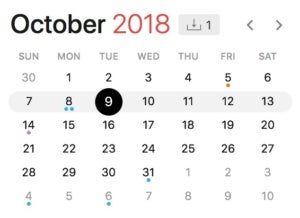
oct. 9 2018IDG/Gregg Keizer

Microsoft retires Windows 10 1703, the early-2017 feature upgrade labeled Creators Update, for customers running Windows 10 Home and Windows 10 Pro.
For Windows 10 Enterprise and Windows 10 Education, today is the end of support for version 1607, aka the Anniversary Update from 2016. Those customers must migrate to a newer version — 1703, 1709 or 1803 — by this date to continue receiving security patches.
Microsoft will probably begin offering what it calls "paid supplemental support" to volume license customers running Windows 10 Enterprise 1703 or Windows 10 Education 1703 around this time. Although those customers will receive an additional six months of free support — through the spring of 2019 — the paid supplemental support will hand them an additional 12 months of patches ... for a fee. (Microsoft has been cagey about the price of the paid supplemental support.)

Jan. 15, 2019

Around this date, Microsoft will declare 1809 as thoroughly tested by consumers, and thus, ready for wide deployment throughout the enterprise. The September update will start appearing on Windows 10 Pro and Windows 10 Enterprise PCs that rely on Windows Update for Business (WUfB).
march 2019IDG/Gregg Keizer

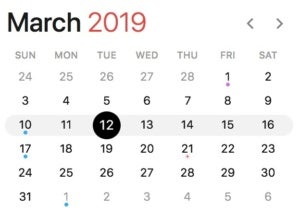
March 12, 2019

Windows 10 1903 launches between this date and late April.

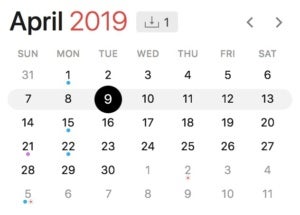
April 9, 2019

Microsoft removes Windows 10 1709, aka 2017's Fall Creators Update, from the Windows 10 Home and Windows 10 Pro support lists, halting security and non-security updates to devices running those editions.
april 9 2019IDG/Gregg Keizer

Also, on this date, Microsoft stops serving all updates to Windows 10 Enterprise 1703 and Windows 10 Education 1703, ending the 24-month-and-change support lifecycle for the feature upgrade that debuted in April 2017.
Microsoft's latest moves have established that the company starts counting the months of support from the actual launch of the feature upgrade, not from the supposed March and September release targets.
Microsoft sets the end-of-support date on the first Patch Tuesday — the second Tuesday of the month — following the 18th or 24th month anniversary of release. For example, Microsoft started shipping 1803 on April 30, 2018, making the 18th-month anniversary Oct. 30, 2019. But the stop-support date for Windows 10 1803 has been penciled in as Nov. 12, 2019, the next Patch Tuesday.
Clear? Good.

July 15, 2019

Around this date, Microsoft will notify customers -- on a post to a company blog -- that Windows 10 1903 is stable enough to deploy to all corporate PCs and will simultaneously begin seeding Windows 10 Pro and Windows 10 Enterprise PCs with the upgrade via Windows Update for Business (WUfB).

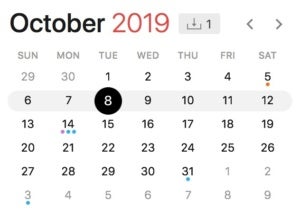
Sept. 10, 2019

Windows 10 1909 begins reaching users at some point between this date and the end of October.


oct. 8 2019IDG/Gregg Keizer

Nov. 12, 2019

Microsoft halts support for Windows 10 1803, putting an end to security and non-security updates to devices running the feature upgrade.
All editions of Windows 10 — Home, Pro, Enterprise and Education — will exit support on this date, according to the definitive "Windows lifecycle fact sheet." As of the 1709 feature upgrade, Microsoft has dropped the extra six months of support for Windows 10 Enterprise and Windows 10 Education customers.
Microsoft was cagey when it first announced the extra six months earlier this year; it specifically called out the feature upgrades issued up until then — 1511, 1607, 1703 and 1709 — but said nothing about an extension for, say, 1803.
At the time, Computerworld expected that the support addendum would be made permanent for Windows 10 Enterprise and Windows 10 Education, in part because research analysts confirmed that many of their corporate clients hoped for a 24-month support lifecycle.
Microsoft didn't agree.
This is also the date when Microsoft retires Windows 10 Enterprise 1709 and Windows 10 Education 1709 from support. Customers running those must upgrade to version 1809, 1903 or 1909 by this date to continue receiving security patches and non-security bug fixes.

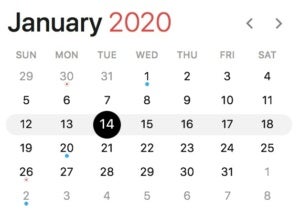
Jan. 14, 2020

Microsoft will retire Windows 7 from support on this date, marking the general deadline for enterprises to replace that OS with Windows 10.
jan. 2020IDG/Gregg Keizer

There will undoubtedly be laggards, and some companies will probably pay to extend support, assuming Microsoft offers something for Windows 7 that resembles the "Premium Assurance" for Windows Server and SQL Server.
What with Windows 7 expected to remain on huge numbers of PCs come the 2020 retirement — perhaps on up to 35% of all Windows personal computers — Computerworld believes it's inevitable that Microsoft will dangle a more-money-for-more-support deal.
How much time? Computerworld's bet is just 12 months, the same stretch Microsoft offers Windows 10 Enterprise and Windows 10 Education volume licensees when they pay for what it calls "paid supplemental servicing," a new program the company kicked off in February.
Somewhere near this date, Microsoft will proclaim 1909 as sufficiently tested (by consumers) and ready for wide deployment (by commercial customers). The September update will begin appearing on Windows 10 Pro and Windows 10 Enterprise PCs that rely on Windows Update for Business (WUfB).

March 10, 2020

Windows 10 2003 releases some time between this date and late April.
april 2020IDG/Gregg Keizer

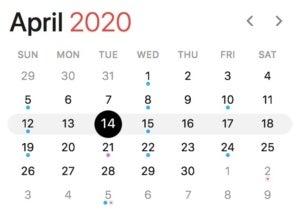
April 14, 2020

Microsoft strikes Windows 10 1809 from the support list on this date or later, stopping security and non-security updates to devices running the edition.
(The most likely alternate stop date would be May 12, 2020, which could come into play if Microsoft releases 1809 after Oct. 31, 2019.)
This story, "Windows 10 update (and retirement) calendar: Mark these dates" was originally published by Computerworld.

Friday, August 3, 2018

Don't delay any longer updating Windows 10

{This was taken from ZDNet.com.  I'm republishing the whole article.  I stayed on a previous, but not even out of date, version on one of my computers for longer than I should have and I got caught in a situation where the update program would not work any more.  My only option was to reinstall the operating system.  This underlined a flaw in the release process used my Microsoft, but there is nothing a user can do but take it on the chin.  The information below warns that you had better be on version 1803 by the end of September.  If you need help let me know.  To see what version you are on, assuming it is Windows 10, click on the "start" icon and type "about".  Up should pop a couple of selections, one of which is "about your pc."  Click on that.  Your version will be under the heading "Windows specifications." }

With Version 1703 of Windows 10 servicing ending on October 9, 2018, Microsoft has decided to remind users visiting the Microsoft Store that it's time to "Update your PC by October 9, 2018. Join the millions of people who are up to date".

And by that the company probably means joining the 250 million of the nearly 700 million Windows 10 PCs now on the April 2018 Update or Windows 10 1803, released in April.

Windows 10 Version 1703, the Creators Update, was released in May 2017 and reaches end of service in just over three months, about the time Microsoft will be putting out the Redstone 5-codenamed version of Windows 10. In October 2017, it gave the world the Fall Creators Update, 1709.

In June, Microsoft declared Windows 10 April 2018 Update generally available, meaning it is available to all the devices in the world that support Windows 10, so in theory users should be safe to make the upgrade.


For a variety of reasons, including the sheer size of major version updates, some people put off these updates.  (One of the most common is that the updates seem to be buggy when installed, and it is costly and difficult to back out.  DGL)

With the April 2018 Update, Microsoft started alerting people that updates are pending but also for the first time gave them the option to reschedule a restart time, begin the update immediately, or delay the decision until later.

Although the default position of Microsoft is to push Windows 10 out as fast as possible, in 1703 there was an option to avoid the update by stating that your connection was metered and it would not install.

The latest update message, spotted by Windows Latest, tells all users not on the latest version of Windows 10 that they're running an outdated version and then sends them to a Microsoft page that promotes the latest security built-in enhancements to Windows 10.

But the message is intended solely for users on version 1709: "Your device is running an older version of Windows 10. To continue to receive security updates and enjoy the latest features Windows 10 has to offer, you need to update your device to a newer version of Windows 10," Microsoft says.

Users get an option to Update Now, which will install the Windows 10 Upgrade Advisor app if clicked.

For those who have held off upgrading to subsequent Windows 10 versions, now would be a good time to update, given that "end of servicing" means no more security patches.

Microsoft releases hundreds of important Windows security patches each year, and if they're not already under attack at the time of release the chance they will be increases over time.

Besides that, Microsoft has taken on the role of releasing Intel's Meltdown and Spectre patches, which 1703 machines won't be getting after October 9 either.

Unfortunately for Microsoft, this initiative won't help its ambition to get Windows 10 across the "nearly" 700 million mark that's been touted for the past few months.

Monday, July 16, 2018

It looks like that season for ransomware- this one uses your very own weak, old passwords to blackmail you


The email follows.  By the way, none of the allegations are true. 
This is a summary from Silicon Republic:

Email scam aims to frighten users into paying a digital ransom

A new twist on an old email scam is doing the rounds, according to Infosecurity Magazine. The basic skeleton of this email sextortion campaign has been around for years: the sender of the email claims to have webcam footage of the recipient watching pornography and demands a bitcoin ransom (of course, the footage claim is a social engineering tactic – one that works).
The twist here, though, is the email includes a password the recipient may have used for an online account. Luckily, the passwords sent so far are all close to 10 years old, according to people who received the email threat, which points to the information coming from a past data breach dating back a long while.
This scam could end up becoming more refined and convincing as time goes on, so it is still worth keeping an eye on your inbox.

I'm going to cut to the chase. I am aware xxxxxxxx is your password. More importantly, I know your secret and I've proof of this. You don't know me and no one employed me to investigate you. 

It's just your misfortune that I discovered your misadventures. Well, I installed a malware on the adult vids (porn) and you visited this web site to have fun (you know what I mean). When you were busy watching video clips, your browser started out functioning as a Rdp (Remote desktop) with a keylogger which provided me with accessibility to your display and also web cam. Right after that, my software program gathered your entire contacts from your social networks, as well as e-mail. 

Next, I put in more hours than I probably should've investigating into your life and generated a two view video. 1st part shows the video you had been watching and next part shows the recording of your web camera (its you doing dirty things). 

Frankly, I'm ready to forget details about you and let you move on with your life. And I am about to provide you two options that will achieve that. The above option is with the idea to ignore this letter, or perhaps pay me $2900. Let’s examine those 2 options in more detail. 

Option One is to ignore this e-mail. You should know what will happen if you opt this option. I definitely will send your video to your contacts including friends and family, coworkers, and so forth. It won't help you avoid the humiliation you and your family will face when relatives and buddies discover your unpleasant videos from me. 

Other Option is to send me $2900. We’ll call this my “confidentiality charges”. Now let me tell you what happens if you choose this path. Your secret remains your secret. I'll delete the recording immediately. You go on with your routine life as if nothing ever happened. 

At this point you may be thinking, “Let me call cops”. Let me tell you, I've covered my steps in order that this mail can't be traced back to me and yes it won't stay away from the evidence from destroying your lifetime. I am not planning to steal all your savings. I am just looking to get paid for my time I put in investigating you. Let's hope you've decided to make this all disappear completely and pay me my confidentiality fee. You'll make the payment by Bitcoins (if you don't know how, search "how to buy bitcoins" on google) 

Amount to be sent: $2900 
Bitcoin Address to Send to: 1KBVnnJCPMDai81kMq2sUMFPKejAo7svE9 
(It's case sensitive, so copy and paste it carefully) 

Tell no one what you should be transferring the bitcoin for or they will often not sell it to you. The method to get bitcoins may take a couple of days so do not put it off.
I've a special pixel in this mail, and right now I know that you have read through this message. You have 1 day in order to make the payment. If I do not get the Bitcoins, I will, no doubt send your video recording to your entire contacts including relatives, co-workers, and so forth. You better come up with an excuse for friends and family before they find out. Nonetheless, if I receive the payment, I'll destroy the video immediately. It is a non-negotiable one time offer, thus please do not waste my time & yours. Time is running out.

Sunday, July 15, 2018

Fake call (scam): To Dell owners- caller knows tag and service code and insist on fixing problem

This is hitting hard around here:  tech call says you are having a problem with your Dell computer and wants to fix it for you.  To prove they are the real thing, they read off your service tag and your express service code.  You drop your skepticism and let them on your computer, where they show you the event log, telling you that your computer has all these errors and must be fixed.  It is a standard scam from that point.  If the call is from "Dell" hang up.

As for reporting this, Dell is apparently asking you to send a private message to them.  However, since this has been going on for at least 3 years, Dell obviously considers it a problem they can't handle. 

Clearly and obviously, someone has hacked into Dell and may still be hacking into Dell and stealing the user information.  It might be an inside job, since so much of what goes on at any support center today is overseas where they are lax and may be on the take.  It would be nice if the white hatters out there would trace these crooks down and hack their systems to determine the sources.  Dell, why aren't you in the forefront? 

References:

https://www.dell.com/community/Customer-Care/SCAM-Tech-Support-Call/td-p/5134886

Tuesday, May 8, 2018

How to see what information Google and Facebook have on you!

I apologize!  I've been AWOL for a while.  I have web page from Ask Leo! that everyone should read and take seriously.  It tells you how to find out what information Facebook and Google know about you.  I was shocked- and I try to be careful.  Here is the link:  https://askleo.com/download-facebook-google-data/?awt_l=8ysdX&awt_m=Jt5ZTjvAI3dfbL&utm_source=newsletter&utm_campaign=20180508&utm_medium=email&utm_content=featured

There is even a video on that page demonstrating the instructions. 

OK, so you don't care... but remember, anyone who can get on your computer or log on to your account can dump all that information.  So... teens- guess what your parents can do!  Guess what your friends or your siblings can do!  I apologize in advance for this warning, but couples- guess what your other half can do! 

Sunday, March 11, 2018

Using Chrome to Block Sound from those pesky sites that start videos when you land on the page

A recent added Chrome feature is blocking the sound of sites.  This is useful when a video starts when you land on a site, even though you don't want the video to play.  I know this irritates me.  For example, the downloads.cnet.com has this on every download page, eg,  http://download.cnet.com/Malwarebytes/3000-8022_4-10804572.html.

The announcement of this feature is here:  https://blog.chromium.org/2017/09/unified-autoplay.html.  You can Google more about this feature, but the "bottom line" is:  To permanently mute site you visit where you don't want videos to automatically play,

  1. Right click the tab for that web page, at the very top of the browser window, just to the left of the x on the tab. 
  2. (Yes there is a drop down list!)  Pick "mute site" to permanently turn off the site.  
  3. To turn the sound back on, go to the dropdown and "unmute site".
To improve web browser performance for those with slow internet, it would be nice if you could completely and permanently stop the video from playing using the same process.  I'm thinking this will come.  There is another approach that will do just that, but it is techie and is for all web pages.  Instructions:  http://www.thewindowsclub.com/stop-videos-from-playing-automatically-on-websites.

Saturday, March 10, 2018

New Ransomware Technique- ransom note plus sound

The following is a picture of a new ransomware approach.  It includes this full screen display plus sound narration warning of the danger and urging action.  This is done using your device's browser, so, to fix the problem, bring up your task manager and kill the browser task.  Note that their may be many instances of your browser.  Kill them all because the next thing you have to do is clean out your browser caches.  A full instruction guide on eliminating this problem can be found at https://www.bleepingcomputer.com/virus-removal/remove-microsoft-system-security-alert-browser-tech-support-scam.  This is a very complete guide. In general, the threat is removed by cleaning out your caches (use CCleaner free version) and running Malwarebytes.  Download the free trial version of Malwarebytes and keep it running for the trial period.  (To purchase is up to you.  Malwarebytes works in a different way than the antivirus programs and can be added to your security system as an enhancement.  But, if you have the discipline of secure browsing plus manually running Malwarebytes on occasion, you can use the free version.  I need another blog entry to show how to turn your trial into a free version.) 


Printfriendly

Print Friendly and PDF